Showing posts with label Software. Show all posts

Friday, October 29, 2010

Top 5 IPhone Apps You Don't Know About Yet

1. SNAPTELL EXPLORER (FREE) - Like to be an educated consumer who can confidently make purchases at the lowest price? SnapTell is your new best friend. Utilizing the iPhone's camera, you can snap photos of items on a store's shelf and almost immediately be given links to price searches, wikipedia information and other websites. Works on DVDs, CDs, Videos Games and Books and queues links to Google, eBay, YouTube, Amazon, IMDB and more. As impressive to friends as it is helpful to you.


2. JOOST (FREE) - Looking for Free Streaming Media? This is the App for you. Joost is hopefully just the tip of the iceberg for media streaming (come on Hulu!). Sporting an impressive collection of content, including full length movies like Men in Black, Karate Kid and Ghostbusters and TV Shows like Friends and Gilmore Girls, Joost holds its own on even the EDGE network. Great for lunch breaks and killing time, this is a must have for anyone who doesn't like paying for video content.

3. DOCUMENTS ($3.99) - One of the first fully functional Word Processing and Spreadsheet applications for the iPhone. Easy to use, easy to organize, Documents finally allows iPhone users to create Text and CSV files on the go. Files can be uploaded to your existing Google Docs account and accessed from any computer. Built-in folder system is a wonderful touch.


4. AROUND ME (FREE) - Location-aware software that tells you what's in the area. Great for finding Gas Stations, Restaurants, ATMs and more.
5. EASYTASK MANAGER (FREE) - Of all the To Do Lists and Task Managers available for the iPhone, this is one of the only ways that follows David Allen's famous Getting Things Done system (GTD!). A revolutionary and simple plan for maximizing productivity, this App is perfect for David Allen followers. Beta testing has begun for wirelessly syncing with your Mac.

Thursday, January 28, 2010

Spped up your browsing experience

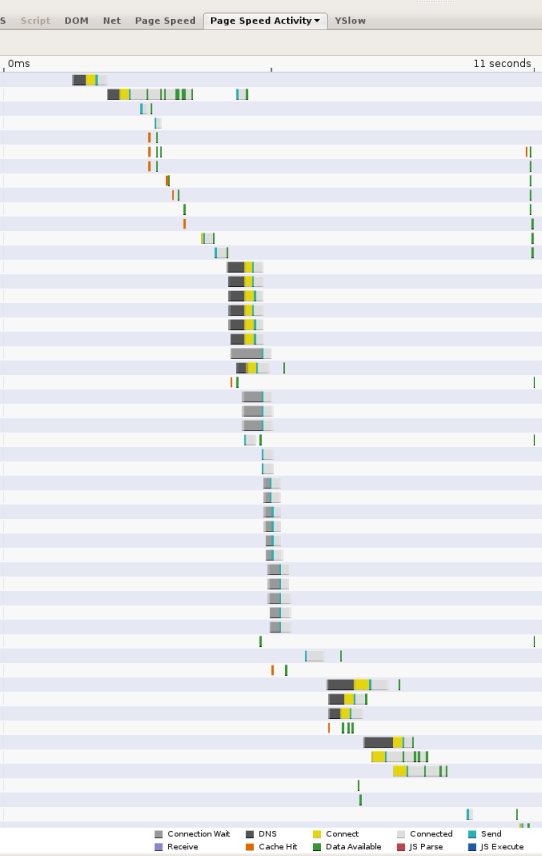
As web pages become more complex, referencing resources from numerous domains, DNS lookups can become a significant bottleneck in the browsing experience. Whenever a client needs to query a DNS resolver over the network, the latency introduced can be significant, depending on the proximity and number of nameservers the resolver has to query (more than 2 is rare, but it can happen). As an example, the following screen shot shows the timings reported by the Page Speed web performance measurement tool. Each bar represents a resource referenced from the page; the black segments indicate DNS lookups. In this page, 13 lookups are made in the first 11 seconds in which the page is loaded. Although several of the lookups are done in parallel, the screen shot shows that 5 serial lookup times are required, accounting for several seconds of the total 11 seconds page load time.


How to use google DNS ??

What is Google Public DNS?

What is Google Public DNS?

Google Public DNS is a free, global Domain Name System (DNS) resolution service, that you can use as an alternative to your current DNS provider.

To try it out:

* Configure your network settings to use the IP addresses 8.8.8.8 and 8.8.4.4 as your DNS servers or
* Read our configuration instructions.

If you decide to try Google Public DNS, your client programs will perform all DNS lookups using Google Public DNS.

Why does DNS matter?

The DNS protocol is an important part of the web's infrastructure, serving as the Internet's phone book: every time you visit a website, your computer performs a DNS lookup. Complex pages often require multiple DNS lookups before they start loading, so your computer may be performing hundreds of lookups a day.


Why should you try Google Public DNS?

By using Google Public DNS you can:

* Speed up your browsing experience.
* Improve your security.
* Get the results you expect with absolutely no redirection.

Watch rhis video 

Tuesday, January 26, 2010

How to find serial numbers using google


94FBR was part of a Microsoft Office 2000 product key that was released on the internet that bypassed Microsofts activation system.

Wednesday, January 20, 2010

Ecobee - Internet enabled smart thermostat demo -iphone application

Ecobee - Internet enabled smart thermostat demo


you can download this application from apple store or
visiting
ecobee.com

Monday, January 18, 2010

Google's new 411 Free service

Dial from any phone

1-800-GOOG-411
(1-800-466-4411)

About GOOG-411
Google's new 411 service is free, fast and easy to use. Give it a try now and see how simple it is to find and connect with local businesses for free. (*)


Thursday, January 14, 2010

How to get google voice invite for free phone service

Please see thie video to know about free invite

Unlimited Free Calling by Google-Google Voice

Google Voice is a free service offered by Google and is designed to help you manage your phone calls. When used for its original intended purpose, Google Voice can add unlimited calling to and from US phone numbers to any landline. With a little more effort, that benefit can be extended to cellphones with "calling circles", or plans that allow a certain number of non-free phone numbers to be converted into free calls. With even more effort and a suitable phone, the feature can be further extended to not only maintain free calling even after a carrier decides those calls should no longer be free, but to also maintain free calling while roaming outside of the United States. Finally, with the greatest amount of effort, one or two lines with unlimited calling 24x7 can be added to any home or business.


2. Free Calling from a Landline

Google Voice offers two ways to enable 24x7 free inbound and outbound calling for landline phones based in the US. First is a method that works the same way no matter what kind of phone you end up using to make a call. From the main Google Voice web page (http://voice.google.com) you are able to enter phone numbers or choose contacts from your Google Voice contact list. With the phone number entered or selected, click the Call button or link.

When viewed on a full PC browser, you will be asked which phone you would like Google Voice to ring. When viewed on a mobile phone browser, Google Voice will dial the phone number currently selected in the "My Mobile Number:" line on the Settings page. No matter which version of the website you use, ensure that your landline is selected as the phone you want to use for the call. Start the call and the selected phone will start ringing. As you don't get the option to choose which phone to ring when using the mobile browser, you must ensure you have the correct phone line selected prior to initiating the call.

Once Google Voice calls you, answer the phone. You will immediately hear the ringing sound of an outbound call. This is Google Voice connecting you for free to the number you entered or selected on the website. As landlines don't typically incur any charges to receive calls (except "collect calls" where the recipient is asked to pay), there are no special steps to take to receive calls for free. If you are home quite frequently, don't have unlimited long distance calling on your house line, have access to the web on your cellphone, but don't have a lot of cellular minutes to spare, this is a great way to make unlimited free long distance calls from your home, without giving out your home phone number.

Just pull out you cellphone, bring up the Google Voice page, make sure your house phone is selected as your Mobile phone number, and enter or select from the directory the phone number you would like to call. This method works regardless of whether or not your Google Voice number is a local call to your house number since all calls will be inbound to your landline.

The second method is entirely different, and is most beneficial if the Google Voice number you selected at signup is a local to you and you don't have long distance service. It is also much simpler to use. Just pick up your phone and dial the Google Voice number you selected. From the main menu, press the number 2 and you will be asked to dial the number you wish to reach. Google Voice then connects you, for free, to the number you dialed, so long as the number is in the US.

If your landline already has unlimited long distance or the numbers you call are within your local or regional flat rate calling area, the main benefit of using Google Voice is to mask your home phone. The people and businesses you call will see your Google Voice number on their caller id, and will only need to know one phone number to reach you.


3. Free Calling from a Cellphone (using the Voice plan)

Central to Google Voice is the ability to manage your phone calls and SMS text messages. Just as when using your landline, Google Voice can also help you mask your personal cellphone number to other parties,showing them just one phone number for reaching you. With a little planning (and a little cooperation from cellphone companies), Google Voice can help you turn your cellphone into a flat-rate, unlimited use phone line. There are generally two ways this can be achieved.

Cellphone usage is priced differently in the US from almost every other country. In general, US cellphone users are charged minutes for both incoming and outgoing calls. The same is true for text messages, although unlimited text messaging plans have been available across all of the major carriers for many years. To help retain and build their customer bases over the years, cellphone companies began by offering unlimited calling to other cellphones operating on the same network. Even that wasn't even enough eventually, and companies began allowing customers to select a handful of out-of-network phone numbers and designate them as effectively being "in network". The out-of-network numbers don't have to be other cellphones or landlines -- users can generally pick any set of numbers they like, and they will never be charged for the minutes used during calls to or from the numbers on the list.

Read full..

Tuesday, January 12, 2010

Update your Flash Player Right Away !!!!

Microsoft has shipped a security advisory with an urgent message for Windows XP users: Update your Flash Player immediately.

The Adobe Flash Player 6 that ships by default in Windows XP is vulnerable to multiple code execution vulnerabilities that could lead to PC takeover attacks, according to the advisory.


Here is the warning

Microsoft is aware of reports of vulnerabilities in Adobe Flash Player 6 provided in Windows XP. We are not aware of attacks that try to use the reported vulnerabilities or of customer impact at this time but recommend that users install the latest version of Flash Player provided by Adobe.

The Adobe Flash Player 6 was provided with Windows XP and contains multiple vulnerabilities that could allow remote code execution if a user views a specially crafted Web page. Adobe has addressed these vulnerabilities in newer versions of Adobe Flash Player. Microsoft recommends that users of Windows XP with Adobe Flash Player 6 installed update to the most current version of Flash Player available from Adobe.

This issue affects Windows XP Service Pack 2 and Windows XP Service Pack 3. The warning is also applicable to users running Windows XP Professional x64 Edition Service Pack 2.

Adobe discontinued support for Adobe Flash Player 6 in 2006. The latest version of Adobe Flash Player is 10.0.42.34.

(source-zdnet.com)

Sunday, January 10, 2010

Google Nexus One V/s Iphone


This video explains well about google nexus v/s iphone .
Now you decide

Windows 7 Themes

Microsoft has lot of themes that you can install from their website

http://windows.microsoft.com/en-us/windows/downloads/personalize


You can download these themes and install it .


I will also recommend
http://windows7news.com/windows-7-theme/
they have a very good collection oh themes too

Saturday, January 9, 2010

Gspace add on for Mozilla - I recommend


This gives you lot of free space on gmail that you can use as your storage online .

Top Addons for Mozilla Firefox

Firefox is the browser of dreams for many people (myself included). One of the great perks of Firefox is that there are tons of extensions that enhance the functionality of the browser. With over 1500 extensions in existence, there are many that can be used to improve your productivity. The following is my take on the top 10 extensions that will keep you focused, reduce distractions, streamline your daily work flow, and improve your productivity.

I strongly recommend that you download all these add ons to increase productivity .

1. Customize Google

20070306-custgoog.jpg

Customize Google is a very robust extension that lets you customize many features of the services provided by Google. Customize Google lets you block advertisements on pretty much any Google page (including Gmail). It remaps Google Images search results to point directly at the images (no longer will you need to click through the originating site). Customize Google lets you add links from other search engines directly into your search results. It can also block Google click tracking and allows you to connect to Google Calendar and Gmail securely (https). Give it a try, you won’t be sorry.

2. Gspace

20070306-gspace.jpg

Gspace is a content management extension that lets you turn your Gmail account into an online mass storage space . Gspace integrates nicely into your browser and lets you drag and drop files into Gmail for backup or storage purposes without interrupting your work flow. If you use Gspace, I recommend adding a tag in Gmail to your files so they can be filtered and accessed quickly. The following is the description of Gspace from its homepage: “Gspace turns the 2GB of your Gmail account into free online storage. With Gspace you can manage unlimited Gmail accounts to store all type of files within its simple, user friendly interface. Listen to your favorite stored music directly from your Gspace, view your collections of pictures and manage your Gdrive files as well. Download Gspace now and transfer files between your computer and Gspace at anytime, from everywhere!”

look at this video made by me that explains gspace in detail

3. Flashgot/DownThemAll
The default download manager built into Firefox is very handy; however, there are many occasions that you’ll find that you need more flexibility with your downloads. This is where Flashgot or DownThemAll comes in handy. The features of Flashgot and DownThemAll have their differences; however, they generally provide finer-grained control of your downloads. My personal preference is Flashgot. I recommend trying at least one of them.

4. Greasemonkey + Stylish + Ad blocking per Gozer
Greasemonkey is an extension that lets you add scripts that alter the web pages you visit. Using Greasemonkey and Stylish and Ad blocking per Gozer together will block pretty much every advertisement from any Web site you visit.

5. Flashblock

20070306-flashblock.jpg

The Flashblock extension by default blocks flash from playing when a Web page is first opened. Most (distracting) advertisements are written using flash. Flashblock is particularly useful because it replaces the flash from a Web site with a “play” button so you can watch the flash if it something useful (like a video at Youtube) and leave it blocked if it is an advertisement.

6. Download Statusbar

20070306-statusbar.jpg

Download Statusbar manages your downloads in the status bar instead of the Firefox Download Manager. I find that the download manager that comes with Firefox to be very intrusive. Download manager tucks your download progress bars into the generally unused status bar of Firefox. This lets you download care-free without the Firefox Download Manager popping up and interrupting you.

7. URL Fixer
URL fixer will replace the common typos you enter when typing a Web site into the URL bar (i.e., http://www.tech-rs.blogspot.ocm, htp://tech-rs.blogspot.com). The auto correct feature of URL fixer is very helpful. “[URL Fixer] will correct common misspellings of .com, .net, .org, .edu, .gov, and .mil, as well as the protocol (http:, https:). It will also correct errors in country code TLDS such as .com.XX, .net.XX, and .org.XX.”

8. Tab Mix Plus
Many of the features of Tab Mix Plus were incorporated into the release of Firefox 2. However, Tab Mix Plus allows you to add finer-grained control of your tabs. The following is a description of Tab Mix Plus: “Tab Mix Plus enhances Firefox’s tab browsing capabilities. It includes such features as duplicating tabs, controlling tab focus, tab clicking options, undo closed tabs and windows, plus much more. It also includes a full-featured session manager with crash recovery that can save and restore combinations of opened tabs and windows.”

9. Scrapbook
Scrapbook is extremely useful for researchers and students. Scrapbook saves blurbs from Web pages to your hard drive along with the URL of the originating Web site. It allows you to organize and categorize your blurbs in a format similar to your bookmarks so that when it comes to creating a bibliography or works cited, you won’t waste any time.

10. IE Tab

20070306-ietab.jpg

I find myself using this extension less and less as more Web developers code their Web sites following standards. However, occasionally you will find it necessary to open a Web site using Internet Explorer in order for it to render correctly. Rather than taking the time to launch a separate browser, just choose “View Page in IE tab” and an Internet Explorer tab opens in Firefox. This is very useful if you like to have multiple Gmail accounts open and active on one computer.

That’s my take on the extensions that will improve your productivity. Like I previously mentioned, there are tons of Firefox extensions. What extension didn’t I mention that you can’t live without? Please tell us about your favorite productivity-enhancing Firefox extension in the comments.

Thursday, January 7, 2010

Learn about YouTube on Nexus One

Learn about YouTube on Nexus One; shoot and upload videos directly to YouTube from the homescreen widget. Watch videos on the 480x800 display.

Wednesday, January 6, 2010

How to watch youtube on PC or WII

Dim the lights, sit back and pass the popcorn. Browse over to a special version of the YouTube website that makes it easy to watch and share your favorite YouTube videos with the whole family.

  • Media Center PC:

    Media Center PC:

    Plug your PC to your TV and go to youtube.com/xl from your web browser.
  • Wii:

    Wii:

    Select "Internet Channel", click on "Web Address", and enter youtube.com.

Vimeo will start HD jan 2010

New York-based video service Vimeo announced Wednesday it will roll out 1080p video (also known as "full HD") to its members by the end of this month.

In order to both see and upload 1080p clips, users will have to be members of Vimeo's paid Plus service, which costs $10 a month, or $60 a year. Regular users will simply see a lower-resolution version of those videos.

here is the link top watch HD videos at Vimeo
http://www.vimeo.com/hd

Sunday, January 3, 2010

Top Free Weather Mobile apps

The following are free weathe apps for your phone . I am posting here only the free apps as i don't think that you should be paying for these anyway .

AccuWeather (FREE)

accuweather Features: Video forecasts, Radar, Severe Weather Alerts, and Weather Indices

This app’s user interface was by far my favorite, but at times it still felt a bit flawed. AccuWeather should have integrated typical iPhone gestures into the application as I often found myself wanting to swipe or enlarge something, only to discover that those features had not been implemented.

Despite this app’s shortcomings, AccuWeather still impresses me by the plethora of weather and climate information it provides. I love when things give me more than I need, it doesn’t matter what the product is. If I get more than I asked for, I am a happy customer, and AccuWeather sees to this.

One of my favorite features is its risk monitoring system, which breaks down severe weather conditions (rain, ice, fog, wind, etc.) and shows the chance of each of them happening over the course of the next 8 hours. Another feature that set AccuWeather apart was its indices feature, which shows UV, Air Quality, Flu, and Arthritis indexes for the day.

Weatherbug (FREE)

weatherbugFeatures: Severe Weather Alerts, Weather Cameras, Radar, and Maps

I’ve always been a fan Weatherbug’s desktop variants, and was pleased to find that the iPhone version was comparable. Weatherbug has all the typical bells and whistles you would expect from a weather app, with a few extras, one of which is a real-time wind tracking, which is updated every few seconds, showing wind speed and direction. I don’t fly many kites or participate in many nautical activities, but I still find this to be a cool feature. It has the simplicity of Apple’s Weather app, but with a few extras, and unlike other free weather apps, it isn’t ad-supported.

The Weather Channel (FREE)

Weather ChannelFeatures: Location-based Forecasts, Radar, Severe Weather Alerts, Video Forecasts, and Traffic Cameras

Being the No. 1 free weather app in the App Store comes with a bit of scrutiny. But what can I say? They are The Weather Channel, and they know what they’re doing. This app doesn’t give any more information than the Weather Channel web site, but it’s great to have such information at your fingertip while on the go. The map feature of this app uses Google Maps with a live update of radar, clouds, temperature, precipitation and UV index. I have very few complaints about this app, but my biggest is the large banner ad on top of the application. I understand that it’s a free app and they have to make money, but it’s a bitobtrusive at times.

Weathereye (FREE)

weathereyeFeatures: Weather Alerts, Hourly forecasts, Traffic Information & Cameras, and Radar

This app is brought to you by The Weather Network, which is a Canadian company. Therefore, this app doesn’t have many of the smaller U.S. towns and cities. Regardless, I still liked it. It’s very similar to Apple’s Weather app in that it is as easy as “swiping” your finger across to switch locations. However, like many of its counterparts, Weathereye is ad-supported.

This app does a great job of covering Canada as well as larger U.S. towns and cities. If you live in rural America…sorry, you’re out of luck.

Pascal Dreer: AeroWeather (FREE)

aeroweatherFeatures: Altitude, Wind Speed/Direction, Sunrise/Sunset Times, Location Awareness, and Runway Reports

I have dabbled in aviation in the past, and have always found it interesting. In the end, my pursuit of aviation was a short-lived one. When I was up there, I could only imagine how crucial knowing the weather could be — literally life or death.

Pascal Dreer took this into consideration by giving us AeroWeather, an iPhone weather app designed with aviation in mind. AeroWeather is a full-service app that displays wind speed/direction, altitude, sunrise/sunset times, runway reports and more. This is the perfect weather app for anyone in the aviation field.

AroundMe iphone app free


AroundMe allows you to quickly find out information about your surroundings.

How many times have you found yourself in need of finding the closest Gas Station?
AroundMe quickly identifies your position and allows you to choose the nearest Bank, Bar, Gas Station, Hospital, Hotel, Movie Theatre, Restaurant, Supermarket, Theatre and Taxi.

AroundMe shows you a complete list of all the businesses in the category you have tapped on along with the distance from where you are.

For every listing you can choose to see its location on a Map, view the route from where you are, add the information to your contact list or even email the information to a friend.

The Nearby listing allows you to find information using Wikipedia about what is around you.

Fast, easy and accurate. AroundMe is your ideal day to day companion.

Thanks to Jerry for uploading this video for review of around me iphone app

Wednesday, December 30, 2009

Windows 7 reviews

I recently bought hp laptop from frys electronics (drowners grove) ,huge store with lot of great deals .
The laptop has windows7 .

Windows7 has some cool features that you will like .It is faster and runs well than vista .
I am hopeful that you will enjoy windows 7 . With snap feature you can work on two windows at the same time .

Snap
1.Snap is a quick (and fun) new way to resize open windows, simply by dragging them to the edges of your screen. Depending on which edge you choose—top or bottom, left or right—the window will expand vertically, fill the screen, or you can even position windows side by side. Snap makes reading, organizing, and comparing windows a...well, you get the picture.


2.With Windows 7, you can point to a taskbar icon to see actual images of all of your open files or programs. Then, move your mouse over the image to preview the window full-screen. Click on the full screen image, and you can start working with it immediately. You can even close windows from the thumbnail previews—a big time saver.

3.I likes this pin your favorite option-
you can pin your favorite programs to your start menu.PinIn Windows 7, you can use pinning to make your PC work even more the way you want. One big improvement is the ability to control where your programs appear on your taskbar. Always want your web browser right next to the start button? Drag the icon where you want it, and it'll stay there till you move it. You can also pin your program icon to the taskbar, so it's there all the time. You can even pin specific documents and web sites to Jump Lists on your taskbar.
Here is video review by newegg.com

Top Threee Email Providers

Gmail

Gmail EmailGmail free email service is one of the most popular global email service. Google designed Gmail free email service for both email and chatting online. Gmail offers nearly unlimited storage and many different search functions for when you are looking for past emails or emails with a particular subject. Another feature of Gmail free email service is the system puts relevant advertising next to any emails read. The interface is smart and precise that is why this is our number one pick for free email providers.

Yahoo!

Yahoo EmailYahoo! Mail free email service has a multitude of features and benefits. A few of the features of Yahoo! Mail free email service is SMS text messaging, instant messaging, RSS news feeds and unlimited storage. A few of the very few criticisms were that the spam filter could be a little tougher on junk mail and it would be a good feature to offer smart folders that you can label as you wish and with multiple tags as well. Although Yahoo! Mail offers keyboard shortcuts which is a pretty cool feature. As far as the spam filter goes, Yahoo! Mail grabs and collects any junk mail in a spam folder with 15 filters for incoming mail. The keyboard shortcuts act like desktop interface and give attention to detail. These features nearly make up for the lack of smart folders and weak spam filtering protection.

Hotmail

Hotmail EmailCurrently Windows Live Hotmail offers 5 GB of online storage. This storage capacity is constantly changing and growing however. Windows Live Hotmail does not have a very effective spam folder nor does Windows Live Hotmail have IMAP access to online folders. Windows Live Hotmail does however have fast search capabilities, an extremely easy and user-friendly interface and POP access. The security with Windows Live Hotmail is standard email security.